


Baby Panda's Emergency Tips
4.1136.00 Reviews
App Specs
- Version
- 8.75.00.04
- Updated On
- License
- Free
- Downloads
- 50,000,000+
- Developer
- BabyBus
- Categories
- Educational
- Platform
- Android, iOS
Screenshots


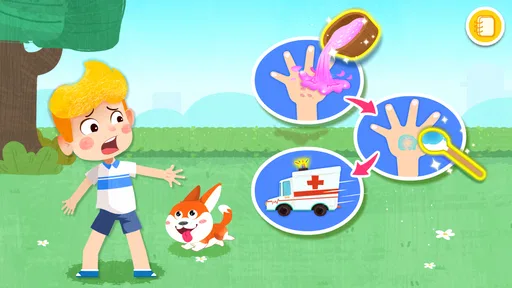
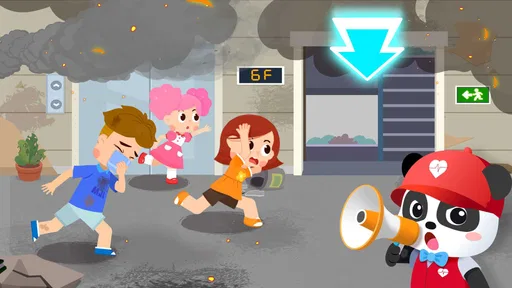
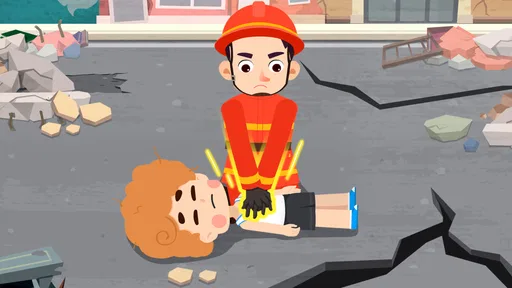

 Analysis by AppCompare
I look for children’s games that give parents something useful to talk about after the screen goes off, and safety-themed play can do that when it is handled gently. Baby Panda's Emergency Tips is an educational game from BabyBus built around helping young children think about what to do in risky situations. I see its strongest role as a conversation starter: a child can explore a simple scenario, then practise the idea with an adult in a calm, familiar setting.
What free access means here
The game is free to download, so a parent can try it without paying upfront. It also offers in-app purchases priced from $0.49 to $2.49 per item. That gives the initial download a clear low-commitment appeal, but I would still check the purchase prompts with a child before handing over a device. The listed age rating is Everyone, and the game is aimed at young learners rather than adults seeking detailed emergency training.
Safety lessons are more useful with a grown-up nearby
The playful format can make safety topics easier to introduce than a lecture or a serious video. I would sit with a child the first time, ask what they think is happening, and invite them to explain their choices. That small pause matters: the point is not to memorise a button sequence, but to connect a game situation to sensible actions and to know when to get help from a trusted adult.
Where it fits among children’s learning games
Compared with a general colouring, puzzle, or alphabet game, this one has a narrower purpose: it puts safety themes at the centre. That focus is an advantage if you want to raise a specific subject in a non-threatening way. It is not a substitute for practical instruction, family safety rules, or emergency-service guidance, and children may learn more from a real conversation about their home and routines than from repeating a game scenario alone.
A practical way to use it
For a realistic routine, I would bring it out during a quiet stretch at home rather than as a distraction in the middle of a stressful moment. After a short play session, ask the child to describe one thing they remember and discuss what they would do in your household. For example, if a scenario involves danger, the follow-up can be about finding a nearby adult and following the family’s plan. This keeps the activity grounded without making a child feel responsible for handling an emergency alone.
BabyBus has built a familiar, child-friendly learning style around its panda character, and the game has an average rating of 3.9 from around 20,000 ratings, with over 50 million installs. It was released on July 28, 2020, and version 8.75.00.01 requires Android 6.0 or later. Those details suggest a widely tried title, though popularity alone cannot tell me whether its approach will suit every child. I would treat it as one optional activity in a broader approach to safety learning.
Engaging Gameplay Meets Educational Content
First off, let’s talk about what makes Baby Panda's Emergency Tips stand out. This app is all about making safety education accessible and entertaining for kids. Through colorful graphics and interactive scenarios, it teaches children how to respond in various emergency situations. Think of it as both a game and a learning tool, which is quite a clever combo if you ask me.
Worth Reading Before You Choose

Flipboard Shows What News Apps Must Do Beyond the Feed

Switching to Android Auto Means Rethinking Your Driving Routine

Google Calendar Makes a Crowded Week Easier to Manage

Ludo King Makes the Most of the Minutes Between Plans

Baby Panda World Brings Quick Play to Modern Phones, but Its Game Library Feels Busy

ESPN’s Live Game View Makes Following Close Games Easier
Vivid Scenarios
The app offers numerous scenarios, from dealing with fires to handling minor injuries. Each situation is designed to be realistic, yet child-friendly, ensuring that kids aren’t overwhelmed. The scenarios are interactive, requiring children to make decisions on what actions to take. For instance, if there's a fire in the scenario, the child learns to "Stop, Drop, and Roll" or to call emergency services. It’s a hands-on approach that sticks with the kids.
Colorful Graphics and Cute Characters
One of the app’s biggest draws is its vibrant graphics and adorable characters. Baby Panda, the main character, guides children through each activity. The animations are smooth, and the colors are bright and inviting, which is perfect for keeping the little ones engaged. I found the graphics to be top-notch, making the educational content even more appealing to kids.
Easy-to-Use Interface
The interface is designed with young users in mind. It’s intuitive and easy to navigate, so kids can explore without much help from adults. There are clear instructions provided in each scenario, ensuring that children understand what to do next. I appreciate how the app empowers kids to learn independently, while also providing a sense of achievement as they complete each task.
Learning Through Play
What I love about Baby Panda's Emergency Tips is its ability to teach important life skills through play. The app encourages children to think critically and act decisively in emergency situations. It’s a subtle way to instill confidence and preparedness in young minds.
Positive Reinforcement
Throughout the app, kids receive positive feedback for making correct decisions. This reinforcement is crucial in helping them remember what they’ve learned. The app also offers rewards and badges, which adds an element of fun and motivation. Who doesn’t like a little reward for a job well done?
Parental Involvement
While the app is designed for independent use, it also encourages parental involvement. Parents can discuss the scenarios with their children, reinforcing the lessons learned. This feature is a great way to spark conversations about safety and ensure that kids understand the importance of the actions they’re taking.
What the game can—and cannot—teach
I would be careful not to treat a child’s success in a game as proof that they are ready to manage a real emergency. A tap-based choice is low-pressure; real situations can be confusing, and children need to know that finding a responsible adult is often the right next step. Use the game to introduce ideas, then make the practical lesson age-appropriate and specific to your family. That balance preserves the confidence-building side without putting too much responsibility on a young player.
Small choices that make play more worthwhile
Rather than letting a child race through activities, I would pause after a decision and ask them to say why they chose it. If their answer is vague, you can clarify the principle in simple language and let them try again. It is also useful to connect a scenario to something the child already knows, such as which grown-ups they can ask for help. These are modest ways to turn a brief game session into a conversation instead of assuming that animated feedback alone guarantees retention.
When another option may be better
If your main goal is formal first-aid instruction, this is not the choice I would rely on: a children’s game is best for a first introduction, not a replacement for qualified teaching or local emergency guidance. A child who gets uneasy around danger-themed stories may also prefer a gentler learning activity, while an older child looking for detailed explanations could find the simplified presentation too basic. In those cases, a parent-led discussion or an age-appropriate lesson is a better fit.
Final Thoughts
In a world where digital content for children is abundant, Baby Panda's Emergency Tips manages to carve out a niche for itself by combining education with entertainment. It’s not just another game; it’s a tool that prepares kids for real-world situations, all while keeping them entertained. Whether you're a parent looking to introduce your child to important safety concepts or just want an app that your kid will enjoy, this one is worth checking out. Plus, it’s a relief knowing that while they’re having fun, they’re also learning something valuable.
So, if you’re ready to turn your little one into a safety superstar, give Baby Panda's Emergency Tips a go. Trust me, it’s a win-win for both you and your child!
My buy-or-skip verdict
I would try it if you want a free, approachable way to open safety conversations with a young child and are happy to take part rather than treat the game as a complete lesson. The paid items mean it is worth keeping an eye on purchase prompts, but the free download makes it possible to assess the fit before spending. I would skip it if you need authoritative emergency training, detailed guidance, or a game with a broader learning focus. For families who want a child-friendly starting point and a reason to talk through everyday safety, it is a reasonable option—as long as the grown-up remains part of the lesson.
Pros
- Engaging
- educational content for kids.
- Colorful and appealing graphics.
- Simple
- intuitive interface.
- Teaches safety in a fun way.
- Regular updates with new content.
Cons
- Limited replay value for older kids.
- Requires internet for full features.
- In-app purchases can add up.
- Some ads may interrupt gameplay.
- Occasional bugs in certain devices.
FAQs for Baby Panda's Emergency Tips
What age group is Baby Panda's Emergency Tips suitable for?
Baby Panda's Emergency Tips is designed for children aged 3 to 6 years old. The app uses engaging visuals and interactive scenarios to teach young kids essential safety tips and emergency procedures in a fun and educational way, making it ideal for early childhood learning.
Does Baby Panda's Emergency Tips require an internet connection?
No, Baby Panda's Emergency Tips does not require an internet connection to play. Once downloaded, all content is available offline, allowing your child to enjoy the app and learn important safety tips anytime and anywhere without worrying about connectivity issues.
Are there in-app purchases in Baby Panda's Emergency Tips?
Yes, Baby Panda's Emergency Tips may contain optional in-app purchases. These purchases can unlock additional content or features. Parents should be aware of this and may want to set up parental controls to manage or restrict purchases if necessary.
How does Baby Panda's Emergency Tips help in teaching safety?
The app uses interactive stories and mini-games to teach children how to react in various emergency situations, such as fire safety, dealing with strangers, and first aid. By simulating real-life scenarios, it helps children understand and remember essential safety tips through engaging and hands-on experiences.
Is Baby Panda's Emergency Tips available on both Android and iOS?
Yes, Baby Panda's Emergency Tips is available for download on both Android and iOS devices. You can find it on the Google Play Store for Android users and the Apple App Store for iOS users, making it accessible for most smartphone and tablet users.


